
If you have been exploring tools that rewrite AI generated text into something that sounds more natural, you may have already seen duey.ai humanizer. It is positioned as an AI humanizing tool that rewrites robotic content, offers file upload support, and pairs that with extras like an AI detector and other writing-related tools. According to Duey.ai’s main site, its humanizer is presented as a free tool for humanizing AI text, while the broader platform also offers paid plans and added features.
That sounds useful, especially for bloggers, freelancers, marketers, and students who want rough AI drafts to read more smoothly. But the bigger question is this: is duey.ai humanizer actually worth using, and who is it best for?
In this guide, we will look at what duey.ai humanizer is, how it works, its features, pricing, possible benefits, limitations, and the best way to use it responsibly.
What Is Duey.ai Humanizer?
Duey.ai humanizer is a rewriting tool built to make AI-generated text sound more natural and human-like. On its homepage, Duey.ai describes itself as “the most human Humanizer for Undetectable AI,” and its content pages say the humanizer can rewrite AI-generated content for free.
The live humanizer page also shows that users can paste text or upload files, including PDF, DOCX, and TXT formats, which suggests that Duey.ai is designed for both short passages and document-based workflows.
In simple terms, the tool is aimed at users who already have a draft and want to improve how it reads. Instead of generating a full article from zero, the humanizer focuses on changing wording, sentence flow, and phrasing so the output feels less mechanical.
Why Duey.ai Humanizer Gets Attention
There are many AI rewriting tools now, but duey.ai humanizer gets attention for a few reasons.
First, it promotes a free humanizer experience on multiple public pages. Duey.ai’s site explicitly says users can humanize AI-generated text at no cost through its humanizer offering.
Second, the platform combines the humanizer with related tools. Public Duey.ai pages also mention an AI detector, document uploads, and broader paid features such as sources, citations, AI autocomplete, and premium support on its pricing page.
Third, it appears to target practical use. The Chrome Web Store listing for its extension describes it as a “Humanizer & Auto Typer” meant to help users spend less time typing and more time on research and studying.
Main Features of Duey.ai Humanizer
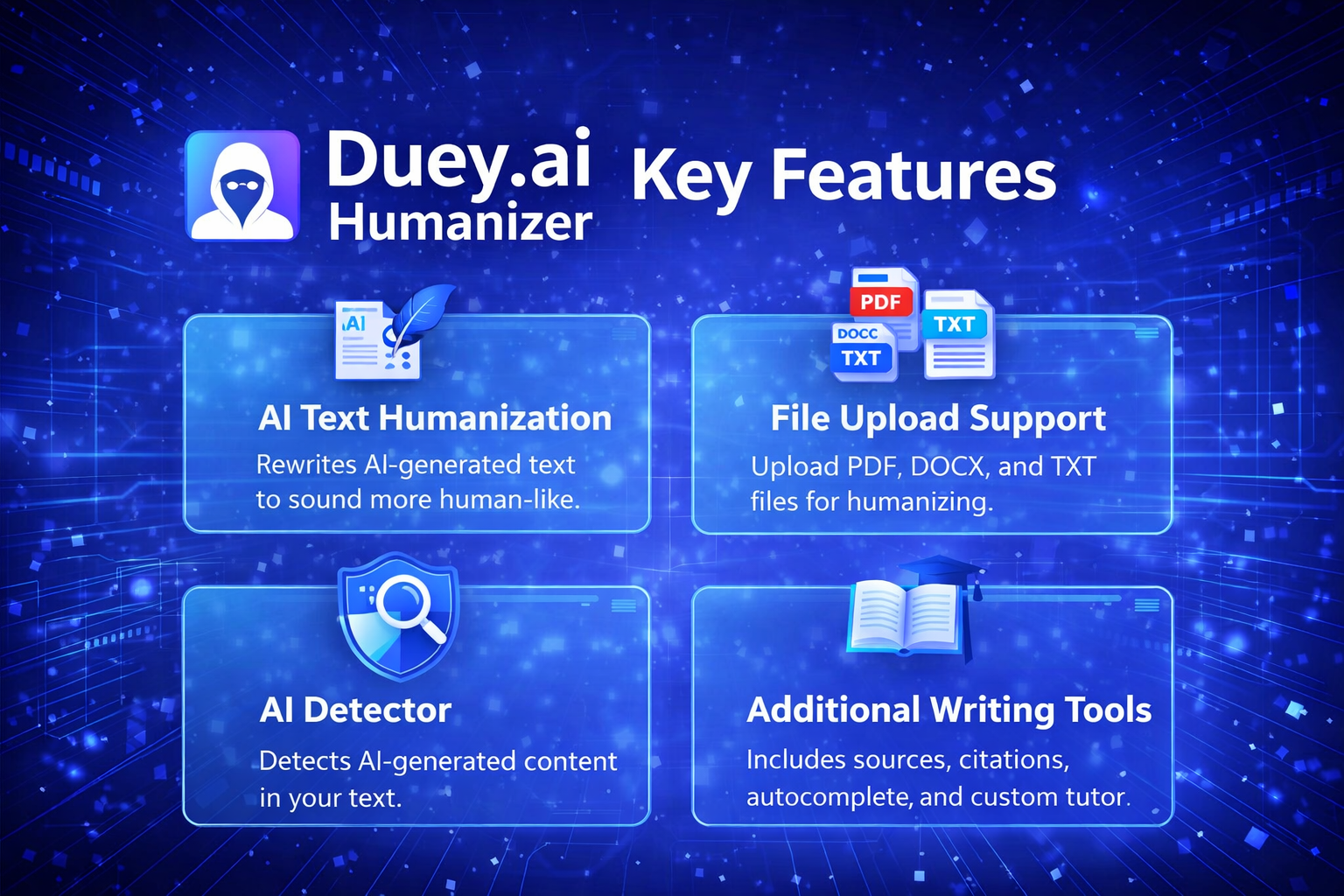
1. AI Text Humanization
This is the central feature. Duey.ai’s public pages describe the tool as a way to rewrite AI-written content so it sounds less robotic and more believable. A blog post on its site says the free lite version is designed to polish AI drafts so they sound more human.
That makes it potentially useful for:
-
blog drafts
-
website copy
-
email writing
-
product descriptions
-
study notes
-
marketing text
The tool is clearly designed for people who already use AI writing but want a more natural final draft.
2. File Upload Support
One feature that stands out is document upload. The humanizer page allows users to upload PDF, DOCX, and TXT files, which is useful for people working on longer documents instead of single paragraphs.
This can save time when editing reports, essays, drafts, or article files that are already prepared.
3. AI Detector Access
Duey.ai also offers an AI detector. On its detector page, the company says users can check whether content might be identified as AI written and then use the humanizer if needed. The same page says the detector and humanizer are built for students looking to see how their work may be identified before submission.
That makes the platform feel more like a bundle of content-processing tools rather than only a basic rewriter.
4. Broader Writing Platform Features
Duey.ai’s pricing page lists more than just humanization. Public pricing details mention PDF/DOCX uploads, a custom tutor for every assignment, sources and citations, AI autocomplete, and premium support as included elements of paid access.
So even though many users may find the platform through the humanizer, the full service appears broader than that.
How Duey.ai Humanizer Works
The general process is straightforward.
According to Duey.ai’s own blog guidance, users sign up, paste their text, and run it through the tool to transform it into more human-like content. The live humanizer page also supports direct text input and document upload.
In practice, the workflow looks like this:
-
Add your AI-generated text
-
Upload a file if needed
-
Run the humanizer
-
Review the rewritten version
-
Edit manually for tone, facts, and clarity
That last step matters. No humanizer should replace final review by a real person.
Duey.ai Humanizer Pricing
Pricing is one of the most important parts of any software review.
Duey.ai’s public pages make two things clear. First, several pages say the humanizer is free to use. Second, the platform also promotes a paid subscription. The homepage says Duey.ai costs $9.99 per month when paid annually or $14.99 per month when paid monthly.
Its dedicated pricing page shows fuller plan information, including a yearly plan and a monthly plan, with the page listing features such as unlimited personal use, AI detection protection, PDF/DOCX uploads, a custom tutor, sources and citations, AI autocomplete, and premium support. The same page currently shows $14.99/month on yearly billing and $29.99/month on monthly billing in the visible pricing blocks, which appears inconsistent with the homepage summary.
Because those public numbers do not fully match across pages, the safest conclusion is this: Duey.ai offers a free humanizer entry point and also has paid plans, but users should verify the current pricing on the official site before subscribing.
Who Should Use Duey.ai Humanizer?
Duey.ai humanizer may be useful for several kinds of users.
Bloggers
Bloggers often use AI for outlines or rough drafts. A tool like this can help smooth awkward phrasing and make content easier to read before publishing.
Freelancers
Freelance writers need speed, but they also need clean copy. A humanizer can be a second-step editor after drafting.
Marketers
Marketing text needs a natural tone. If ad copy, email text, or landing page content sounds stiff, a humanizer may help improve flow.
Students
Duey.ai’s own detector page directly references student use cases and says the detector and humanizer are built for students who want to check whether their writing may be identified as AI generated.
That said, students should still follow their school’s academic integrity rules and use writing tools responsibly.
Users Editing Documents
Because the tool supports PDF and DOCX uploads, it may also help people who are revising longer documents rather than only short snippets.
Benefits of Duey.ai Humanizer
One benefit is convenience. The platform combines multiple tasks in one place, including rewriting, detection, and file-based editing.
Another benefit is accessibility. Since Duey.ai publicly promotes a free humanizer option, it is easier for new users to test the tool before paying.
There is also the workflow advantage. If you already use AI tools for first drafts, a humanizer can act as a cleanup stage rather than forcing you to manually rewrite every paragraph from scratch.
Finally, file upload support is practical for users who handle longer drafts and do not want to paste text section by section.
Things to Keep in Mind Before Using Duey.ai Humanizer
It is important to stay realistic.
First, rewriting tools are not perfect. Even if a paragraph sounds better after humanization, it may still need editing for structure, accuracy, or tone.
Second, AI detectors are not always consistent. Duey.ai offers its own AI detector, but detection tools across the market can disagree with each other. Duey.ai’s detector page frames its tool as a way to see if content may be flagged, which is a more realistic use case than assuming any detector is final or absolute.
Third, the platform’s marketing language includes phrases about “undetectable AI” and “bypass AI detection,” especially on its homepage and pricing page. That should be approached carefully. Users should not assume any tool can guarantee reliable outcomes across all detectors or all contexts.
Is Duey.ai Humanizer Good for SEO Content?
Duey.ai humanizer can support SEO content workflows, but only as one part of the process.
If a blog post draft sounds repetitive or unnatural, a humanizer may improve readability. That can help user experience. But search performance still depends on much more than wording alone, including:
-
search intent
-
useful information
-
originality
-
accuracy
-
structure
-
internal linking
-
updated facts
So yes, Duey.ai humanizer may help refine SEO content, but it does not replace content strategy or editorial judgment.
Is Duey.ai Humanizer Safe to Use?
Duey.ai’s privacy policy says the company provides services to students, including AI content generation and paraphrasing based on user inputs and instructions, and outlines how it collects, uses, discloses, protects, and disposes of personal information.
As with any AI writing platform, users should review the privacy policy for themselves and avoid uploading highly sensitive, confidential, or personal data unless they are comfortable with the platform’s terms.
Pros and Cons of Duey.ai Humanizer
Pros
-
Free humanizer access is promoted on the official site.
-
Supports PDF, DOCX, and TXT uploads.
-
Includes an AI detector on the platform.
-
Paid plans appear to include extra writing tools and support.
Cons
-
Public pricing appears inconsistent across different official pages.
-
Humanized text still needs manual review.
-
Marketing claims around “undetectable AI” should be treated cautiously.
-
Detector results should not be treated as absolute.
Best Way to Use Duey.ai Humanizer
The best approach is simple:
Write or generate your first draft. Then use duey.ai humanizer to improve tone and readability. After that, edit the content yourself for facts, clarity, voice, and structure.
That kind of workflow gives you speed without depending entirely on automation.
It is also the better approach for blogs and websites. Search-friendly content usually performs best when it includes real human editing, useful examples, and clear value for the reader.
Final Verdict on Duey.ai Humanizer
So, is duey.ai humanizer worth trying?
Based on its public pages, it offers a useful combination of free humanization, file upload support, AI detection, and broader paid writing features. That makes it appealing for users who want an extra editing layer after AI drafting.
Its biggest strength is convenience. The tool appears easy to test, supports document uploads, and sits inside a larger writing platform rather than working as a single-purpose rewriter.
At the same time, it should be used with realistic expectations. It can help improve flow and readability, but it cannot replace careful editing, factual review, or ethical use.
In the end, duey.ai humanizer is best seen as a writing support tool. If your goal is to make AI-assisted content feel more natural before final editing, it is a platform worth exploring.
FAQs About Duey.ai Humanizer
What is duey.ai humanizer?
Duey.ai humanizer is a rewriting tool that aims to make AI-generated text sound more natural and human-like.
Is duey.ai humanizer free?
Duey.ai’s public pages say its humanizer is free to use, although the wider platform also offers paid plans.
Does duey.ai humanizer support file uploads?
Yes. The live tool page supports PDF, DOCX, and TXT uploads.
Does Duey.ai have an AI detector?
Yes. Duey.ai offers a public AI detector page alongside its humanizer.
Who should use duey.ai humanizer?
It may be useful for bloggers, freelancers, marketers, students, and anyone editing AI-generated drafts.